
Frontend-Only Spam Filtering: What's Actually Possible
Honeypots, domain restriction, and CAPTCHAs each block a specific class of attacker. Here's exactly what each technique covers and where it stops.
You shipped a contact form. Then came the spam.
You added a honeypot, maybe dropped in a reCAPTCHA widget for good measure, and pushed it to production. But the spam continued anyway: crypto pitches, SEO proposals, garbled Cyrillic you can’t read. Your “protected” form is leaking junk into your inbox every day.
This isn’t a problem you can solve with more detailed configuration. It’s a coverage problem. Honeypots, domain restriction, and CAPTCHAs each block a specific class of attacker, and none of them were designed to cover the full threat. Understanding exactly what each technique does and doesn’t catch is the only way to make an informed decision about how to protect your form.
What honeypots catch
A honeypot is a form field hidden from human visitors with CSS. Bots that scrape HTML and auto-fill every input they find will fill it. Your server checks the field on submission. If the field has a value, it was a bot who filled it, so the submission is discarded.
The classic Formspree implementation uses a field named _gotcha:
<form action="https://formspree.io/f/YOUR_FORM_ID" method="POST">
  <input type="text" name="name" placeholder="Your name" required />
  <input type="email" name="email" placeholder="Your email" required />
  <textarea name="message" placeholder="Your message"></textarea>

  <!-- Honeypot: hidden from humans, filled by naive bots -->
  <input type="text" name="_gotcha" style="display:none" />

  <button type="submit">Send</button>
</form>
Better practice is to hide it with a CSS class rather than an inline style, since a custom class is harder for a bot to fingerprint:
.bot-trap {
  opacity: 0;
  position: absolute;
  top: 0;
  left: 0;
  height: 0;
  width: 0;
  z-index: -1;
}
<input type="text" name="_gotcha" class="bot-trap" tabindex="-1" autocomplete="off" />
Honeypots have one real advantage: zero false positive rate. A human will never fill a field they can’t see, so you won’t accidentally block a real submission. Ideally, they should be on every form.
But the coverage is narrow. Headless browsers such as Puppeteer, Playwright, and equivalents execute JavaScript and parse CSS, which means they can read visibility rules and skip hidden fields. Any spam script written specifically to target your form endpoint (which is barely a few hours of work once someone has your URL) will ignore the honeypot. The technique filters just the class of unsophisticated crawlers running generic form-fill loops.
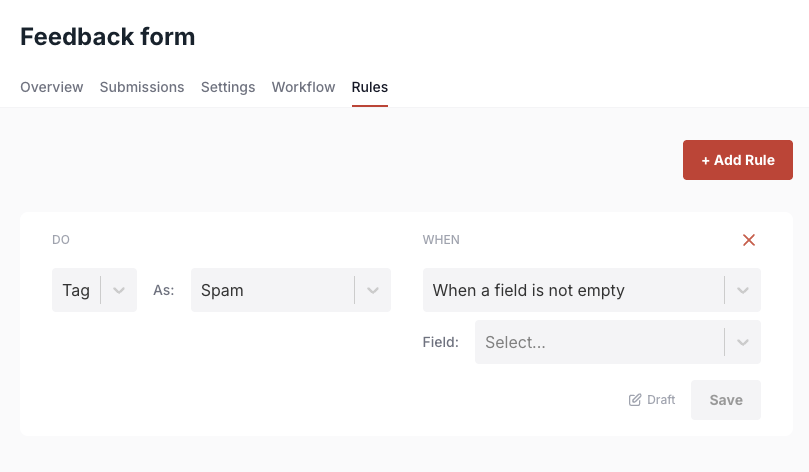
Formspree also lets you create custom honeypot fields with your own names and rules, which makes the trap harder to anticipate since bots can’t rely on recognizing _gotcha specifically. You set a Form Rule that tags any submission where the field is non-empty as spam:
What domain restriction does
Domain restriction ties your form endpoint to a specific origin. Formspree’s “Restrict to Domain” setting checks the Referer header on every submission. If it doesn’t match your configured domain, the submission goes to your spam folder instead of your inbox.
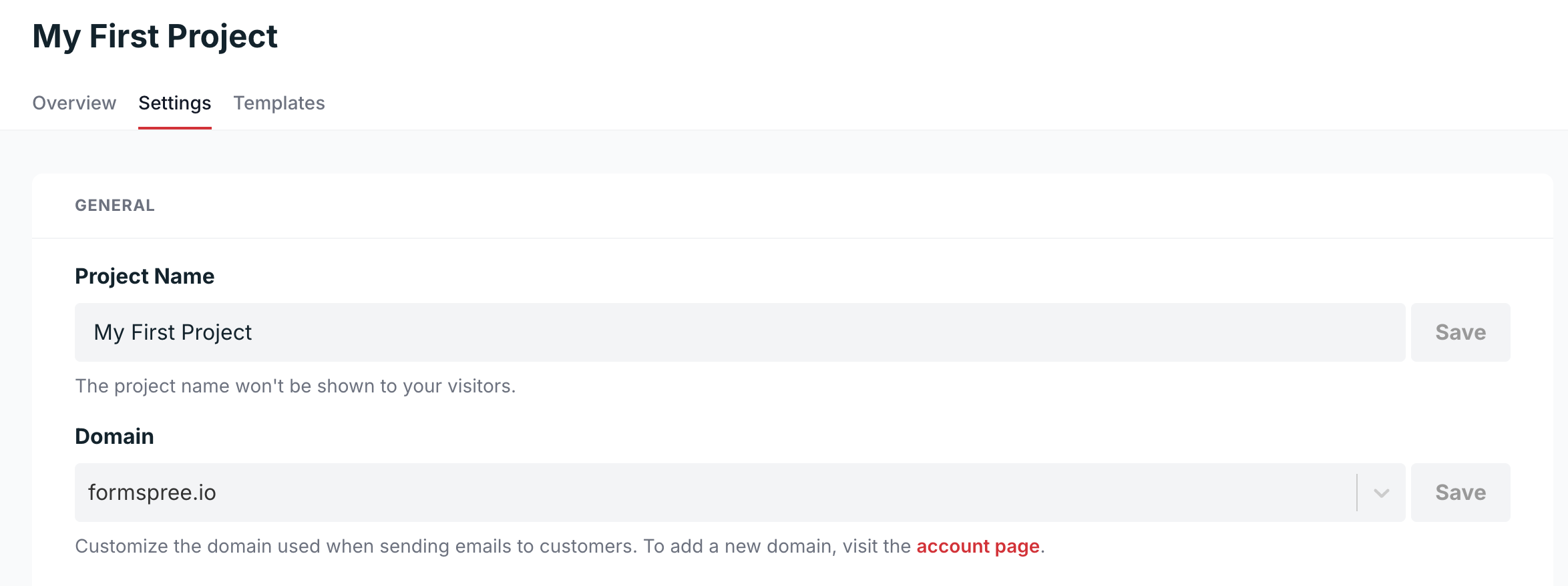
In the dashboard, you’d set this to yourdomain.com. Leave off the www prefix if your site is reachable both with and without it, since adding www restricts submissions to that subdomain only.
This blocks bots that scrape your form’s action URL and POST directly to it from external scripts, bypassing your page entirely. Once a form endpoint is public, it’ll get hit this way. A scraped or leaked endpoint can get hit by scripts that never load your site at all.
It doesn’t block anyone who visits your actual website and submits the form normally. They’ll have a valid Referer header by definition. A spammer using a headless browser that renders your full page, or a human filling out the form manually, passes this check without issue.
What CAPTCHAs do and don’t cover
CAPTCHAs are the most visible layer of spam protection and the most widely misunderstood.
The three most common options you’ll encounter are reCAPTCHA v2 (the “I’m not a robot” checkbox, sometimes followed by image puzzles), reCAPTCHA v3 (fully invisible, scores sessions 0.0-1.0 based on behavioral signals), and Cloudflare Turnstile (behavioral analysis with a lighter privacy footprint than reCAPTCHA). Formspree supports all of those plus hCaptcha.
reCAPTCHA v2
The visible checkbox version is easy to integrate and gives users a clear signal that the form is protected:
<form action="https://formspree.io/f/YOUR_FORM_ID" method="POST">
  <input type="text" name="name" required />
  <input type="email" name="email" required />
  <textarea name="message"></textarea>

  <!-- reCAPTCHA v2 widget -->
  <div class="g-recaptcha" data-sitekey="YOUR_SITE_KEY"></div>

  <button type="submit">Send</button>
</form>

<script src="https://www.google.com/recaptcha/api.js" async defer></script>
With v2, the friction cost is real. Research from Pagewiz found that form submissions dropped 73% on one site after adding a CAPTCHA.
reCAPTCHA v3
v3 scores every session in the background and returns a value between 0.0 (likely bot) and 1.0 (likely human) to your backend. Google’s own documentation notes it won’t interrupt users and doesn’t affect conversion, which is accurate, but the backend decision it requires is where things get complicated.
You set a threshold, and submissions below it get rejected. A score of 0.5, Google’s suggested default, means the session looks equally bot-like and human-like. Set the threshold too high and you block real users whose sessions scored poorly for innocent reasons (VPN usage, privacy browsers, low JavaScript activity). Set it too low and spam still gets through. There’s no universally correct number, and getting it wrong silently fails in one direction or the other.
The CAPTCHA farm problem
CAPTCHAs protect against fully automated bots with no browser context. They don’t protect against human-assisted spam. CAPTCHA-solving services exist at industrial scale. F5 notes that there are services that route CAPTCHAs to human workers for as little as $1-3 per 1,000 solves. Netacea’s investigation found that workers in some farms earn $0.17 per 1,000 standard CAPTCHAs solved. At that price, solving a hundred CAPTCHAs to spam your contact form costs fractions of a cent.
CAPTCHAs kick out a large volume of commodity bot traffic, and that reduction matters. There’s not a ceiling. They’re a floor.
The coverage ceiling of frontend filtering
Every technique above shares one constraint: it runs in the browser or validates data the client provides.
A motivated submitter can disable JavaScript (breaking v3 scoring), use a headless browser that renders CSS (bypassing honeypots and presenting a valid referer), rotate IP addresses to avoid rate limits you’ve set client-side, or pay a CAPTCHA farm to solve the challenge widget. None of that requires sophisticated technical knowledge. These are services you can find and pay for in minutes.
Still, frontend filtering meaningfully reduces spam volume. For low-traffic forms, a personal portfolio or an early-stage startup’s landing page, that volume reduction is often enough. The residual spam after a honeypot and a CAPTCHA is tolerable.
For a form that attracts real attention (a popular open-source project’s contact page, a business ranking for competitive keywords, a form embedded in content that gets shared, etc.), the residual volume isn’t tolerable. You’d need to maintain your own blocklists, write custom rate-limiting logic, build a submission review interface, and update all of it continuously as spam patterns evolve.
What a backend service like Formspree adds
A backend service like Formspree receives every submission and runs it against cross-account submission history, applying filtering logic that no frontend technique can replicate.
This is possible because of scale. Formspree sees tens of thousands per day across every form it handles — patterns that are invisible at the individual form level become obvious at that volume.
Formspree’s Formshield is a machine learning model trained on millions of form submissions. It flags content that matches known spam templates, patterns that show up across many forms simultaneously, before any submission ever reaches your inbox. You can tune its aggressiveness (Neutral, Aggressive, or a custom setting) and toggle individual classifiers based on what your specific form attracts.
Beyond ML filtering, the backend layer adds custom spam rules, so if you’re seeing a wave of submissions containing a particular phrase, keyword, or email domain, you can flag those automatically without touching your code. It adds blocklists for specific email addresses, domains, or content patterns at the account level, with changes taking effect immediately across all your forms. And it adds field-level validation that runs server-side, including checks on email address format and domain legitimacy, which can’t be bypassed by disabling JavaScript.
Putting the layers together
The right combination depends on your form’s exposure and your tolerance for inbox noise.
A personal portfolio or hobby project can get by with a honeypot and Formspree’s built-in basic filtering. That covers the commodity bot traffic that most low-traffic forms attract.
A business contact form or lead capture form on a site with real SEO traffic needs the backend filtering layer. A form endpoint that’s indexed, shared, or mentioned anywhere public will eventually attract automated spam, and frontend filtering alone won’t keep pace with it.
The layers aren’t redundant. Honeypots catch bots that skip CSS. Domain restriction catches off-site POST attacks. CAPTCHAs catch bots that lack browser context. Backend ML filtering catches what none of the above can see. You add them incrementally as your form’s exposure grows.