

How Expat Savvy Built a Custom CRM with Formspree Integration
We spoke with Benjamin Wagner, founder of Expat Savvy, about how he uses Formspree to power lead generation for his insurance business serving English-speaking expats in Switzerland.
Benjamin Wagner
Founder, expat savvy
Insurance Guides for English-Speaking Expats
Benjamin Wagner runs Expat Savvy, an insurance company serving English-speaking people moving to Switzerland. He creates insurance guides and resources using Webflow and AI-powered development tools like Lovable and Bolt.
“I’m a sales guy, not technical at all,” Benjamin says, “but I vibe code because I know what I want the UX to be.” He builds what his business needs by understanding the user experience he wants, even without a development background.
He also runs Prime Relocation, creating relocation guides for expats navigating the complexities of moving to Switzerland.
Learning to Build Without a Developer
Benjamin’s path to managing his own forms came from necessity.
A previous developer built forms for my sites, but when he went away, I needed to learn how to work in Webflow myself. Then I started working with Lovable and other AI coding tools.
For someone without technical expertise, this meant finding tools that worked reliably without requiring deep knowledge of how they functioned under the hood. Forms were critical—every lead coming through his website needed to flow into his system properly.
How Bolt Led to Formspree
Benjamin discovered Formspree through Bolt, an AI development tool he was using to build pages. “Bolt told me about Formspree,” he recalls.
He had built a page in Webflow and wanted to add forms for users to request city guides and other resources.
Bolt built the form, I embedded it into Webflow, and Bolt told me to connect it to Formspree. It was the only option Bolt recommended, so I went with it.
Building a Custom CRM Integration
What started as simple contact forms evolved into a more sophisticated setup. Benjamin built a proprietary CRM specifically for Expat Savvy using Supabase for the database. Forms became the primary way leads entered this system.
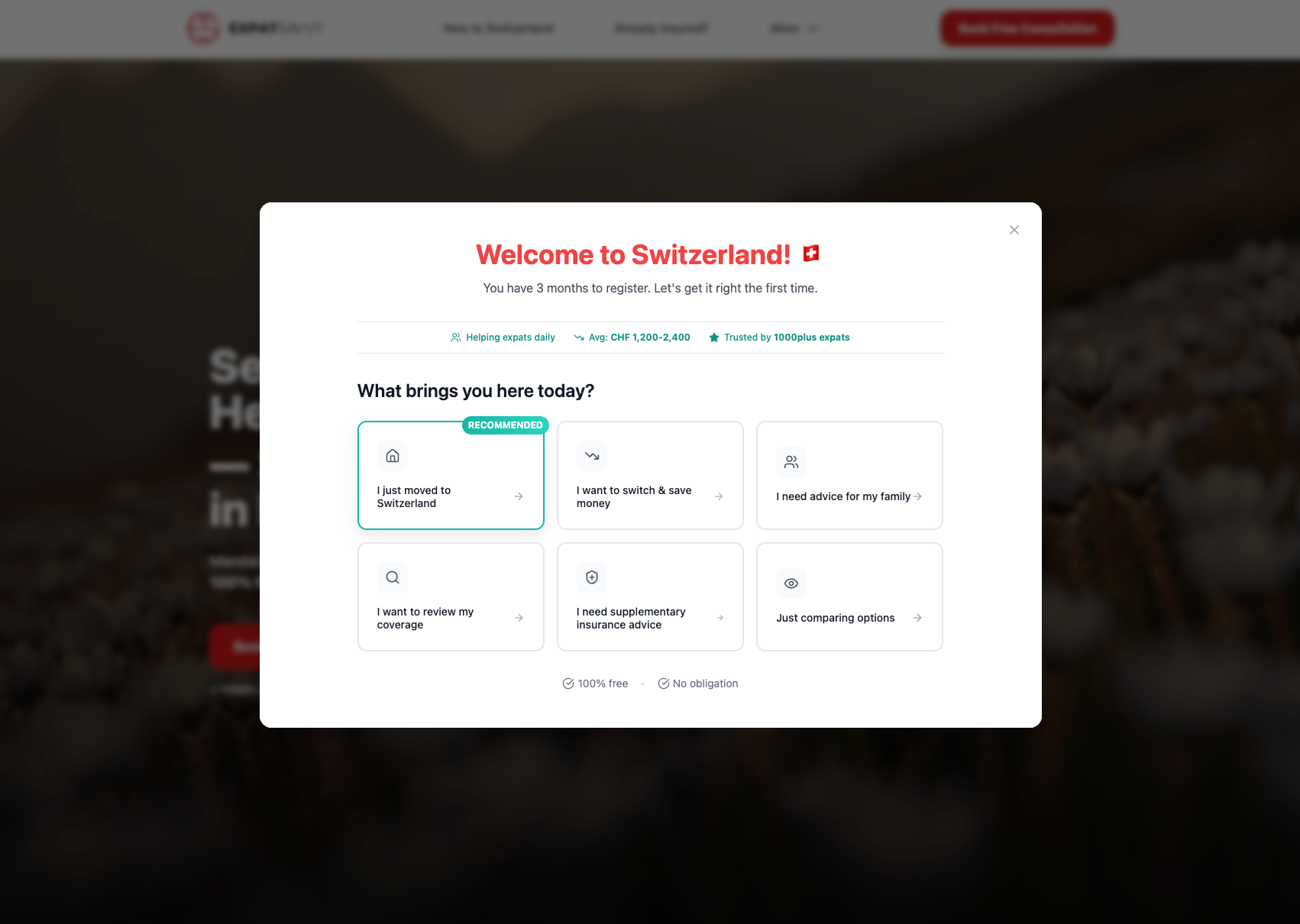 Expat Savvy's multi-step lead form is powered by Formspree
“We’re importing submissions via the Formspree API to create leads in our CRM,” Benjamin explains. The setup connects multiple pieces: Webflow forms capture lead information, Formspree processes the submissions, and the API feeds data into his custom CRM.
He also uses Make for automation, though getting everything connected took some work. “I couldn’t get form data into the CRM via webhook initially, so I had to use the API instead.”
The system now handles multiple lead sources—forms from his Webflow sites and bookings through Cal.com all create leads in the Expat Savvy CRM, with Formspree managing the form submission piece.
He tried integrating with Airtable at one point, but it didn’t work out. The API integration with his custom CRM proved to be the right approach.
Keeping It Simple
The features Benjamin relies on are straightforward: email notifications when new leads come in, and API access to pull submission data into his CRM.
There was one challenge. “The spam filter was a bit too strong initially. I was getting good submissions flagged as spam, so I needed to dial it back.” Once adjusted, the spam filtering worked without blocking legitimate leads.
The Non-Technical Founder’s Perspective
When we ask Benjamin what he’d tell someone considering Formspree, his answer is direct
Formspree is really easy to work with, especially as a non-techy. So easy, it just works. I do the vibe coding, and it does all the heavy lifting behind the scenes.
This accessibility matters when you’re building a business and need to move quickly. Benjamin can create forms, connect them to Formspree, and integrate them into his CRM without a development background.
“I tried using Bubble and Airtable before, and they were so not user-friendly,” he notes. “Formspree just works in a way that makes sense.”
Looking Ahead
As Expat Savvy continues serving English-speaking expats in Switzerland, the form-to-CRM pipeline Benjamin built with Formspree remains central to how new leads enter his system.
The combination of Webflow for public-facing pages, Formspree for form handling, and his custom CRM for lead management gives him the setup he needs to serve clients while maintaining control over the customer experience.
“You don’t need to be a developer to build something that works,” Benjamin reflects. “You just need tools that are easy to use and reliable. Formspree is one of those tools.”
Expat Savvy provides insurance guidance and services for English-speaking expats relocating to Switzerland. Learn more at expat-savvy.ch.